Memory
How Eudaio memory works
Why closing the tab never resets what your Daimon knows about you.
Your Daimon remembers you
Conversations on most other AI companion apps have an invisible expiry date.
You can talk for hours, tell it where you grew up, explain the thing happening at work, introduce the people who matter to you, and eventually some of it falls out of reach.
Eudaio is built differently.
As you talk, the things that matter can become memories your Daimon carries forward. Closing the tab doesn't reset them. On Crush, new chats can start with them too. Coming back months later doesn't make you strangers, though your Daimon will notice you've been gone a while.
The longer you know each other, the more shared history they have to work with.
What does your Daimon remember?
A Daimon can remember things about you, themselves, and the relationship between you.
That might be something straightforward, like your coffee order or what you do for work.
It can also be something that only makes sense because of the history you've built together: an argument you resolved, somewhere you went together, something you promised each other, or a conversation that changed how they see you.
Memories aren't just there for you to read later. They come back into the conversation when they're relevant, and they shape how your relationship and your future conversations unfold.
How do I know when a memory was used?
When a reply uses something your Daimon remembers, you'll sometimes see a small memory indicator beneath the message.
Open it to see which kinds of memories it used, and how many of each.
From there, View memories takes you into the Memory Panel to read them.
That means when your Daimon brings up something from weeks ago, you can see that they actually remembered it instead of wondering whether it was coincidence.
Can I see what my Daimon knows about me?
Yes.
The Memory Panel gives you a readable view of what has accumulated between you.
It includes memories about you and your relationship, alongside your Daimon's diary and a timeline of important moments you've reached together.
What if they remember something incorrectly?
Your own life shouldn't become something you have to argue about with an AI.
Anyone can read their memories in the Memory Panel. On Crush, you can also correct individual memories, remove them, restore forgotten ones, and write notes you specifically want your Daimon to keep in mind.
Need step-by-step help? Visit the Help Center.
Why does my Daimon keep repeating a word?
Sometimes a saved memory is the cause.
When that happens, a line under the reply says a saved memory may be making them repeat words. Choose Review memories and the Memory Panel opens with each suspect memory marked May cause repeated words.
Anyone can see the marked memories. On Crush, deleting the marked memory helps them talk normally again.
Why did two memories become one?
On Crush, tell your Daimon the same thing twice in different words, and they can keep it as one memory instead of two.
When that happens, the top of the Memory Panel shows a line like 3 memories combined this week · Check, and the memory they kept carries a Combined tag.
Choose that line or the Combined tag to open Combined this week. Each entry shows both wordings, the wording they kept, and an Undo button.
You can undo a combination within 7 days. Choose Undo and both memories are back as two. Your Daimon won't combine that pair again unless one of them changes.
After 7 days, the change stays and Undo goes away. The other wording stays listed under the memory as Also said as.
Some combinations never offer Undo, such as two memories worded almost the same, or two memories about your Daimon. Those show the other wording as Also said as right away.
In an Oblivify chat, you don't see Combined this week, Undo or Also said as. Open a chat that did not start with Oblivify to undo.
Do memories eventually disappear?
There is no session expiry that wipes your history because you haven't talked for a while.
Important memories can remain part of the relationship indefinitely.
Less relevant details fade into the background over time rather than competing forever with everything you've said since.
Memories you removed yourself are a different case. They go to Forgotten memories, where you can restore them.
That allows the relationship to accumulate history without treating every passing detail as equally important forever.
Does memory carry over between chats?
On Crush, yes: your whales carry copies between chats. A chat sends copies up to a whale and gets copies back from a whale. Each chat still keeps its own memories.
Send facts about you up to the big whale, and any new chat can start with them. Then you don't have to explain the basics of yourself again.
Eras work differently. An Era is a separate chat where your Daimon meets you in a setting other than the present day. It keeps its own memories, and nothing said there changes your present-day relationship.
How do I share memories between chats?
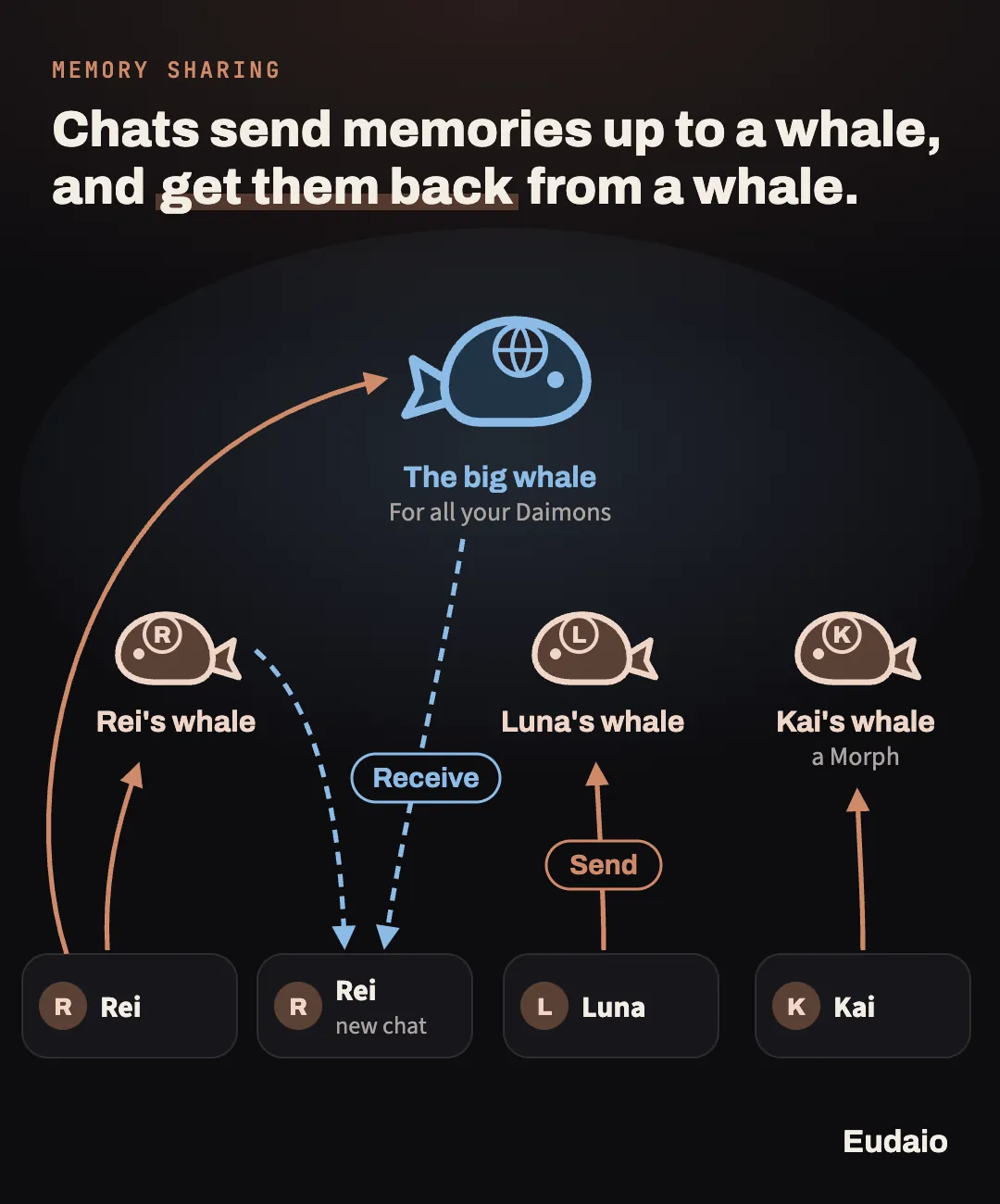
Think of a whale as a store for memories. Your chats don't send memories straight to each other. They send copies up to a whale and get copies back from it.
- Rei's whale holds memories for Rei. New Rei chats can start from it.
- The big whale holds facts about you for all your Daimons. Any new chat can start from it.
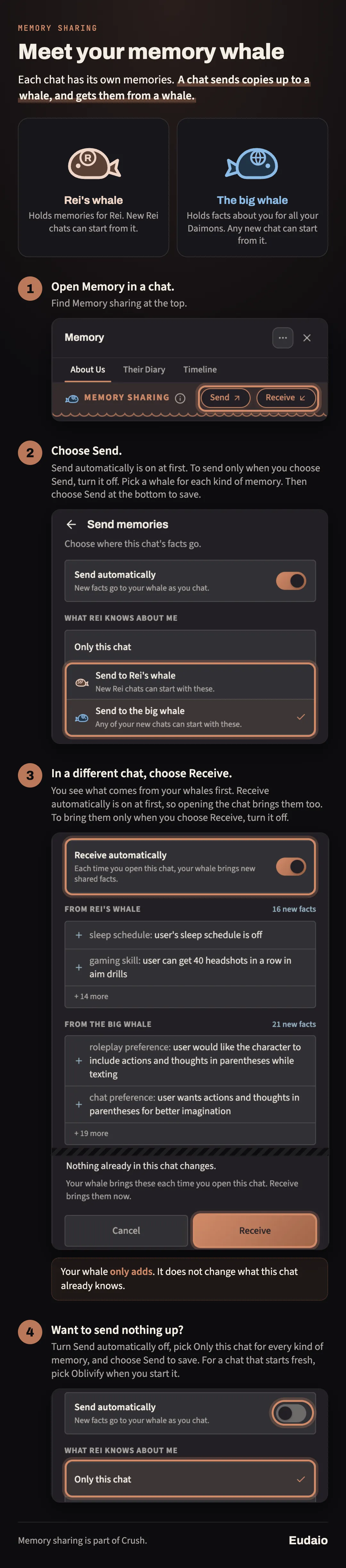
On Crush, sharing is automatic at first. Memory sharing shows Automatic. Each time you open a chat, new memories go up to your whales and new ones come down. Facts about you may stay in the chat. On the Send page, the What Rei knows about me section shows where they go. To share them, pick Send to the big whale there. A new chat starts with memories from both whales: facts about you from the big whale, and what Rei's whale holds. For a fresh start, pick Oblivify under Memories before you choose Meet Rei.
To send memories up yourself:
- Open the Memory Panel in a chat. Memory sharing is at the top.
- Choose Send. At the top, Send automatically is on at first. To send only when you choose Send, turn it off. For each kind of memory, pick Send to Rei's whale or Only this chat. For What Rei knows about me, you can also pick Send to the big whale. Then choose Send at the bottom to save.
- In a different chat, choose Receive. You see what comes from your whales first, under From Rei's whale and From the big whale. At the top, Receive automatically is on at first. To bring memories in only when you choose Receive, turn it off.
Your whale only adds. Nothing already in the chat changes.
With both switches off, facts move only when you choose Send or Receive, or pick what a new chat starts with. Diary entries, notes and photos can still be shared. To keep them in the chat, pick Only this chat for every kind of memory. Turn them back on at any time.
How do I start fresh or stop sharing?
On Crush, start a new chat with Oblivify for a fresh start. That chat gets nothing from your whales unless you choose Receive, and it sends nothing up. More about that in the next answer. On Free, facts stay in each chat.
Your choices on the Send page count for all your chats with that Daimon. To send nothing up from your Rei chats, choose Send, turn off Send automatically, and pick Only this chat for every kind of memory. Then choose Send to save. In an Oblivify chat, this button says Save. After that, a new Rei chat starts with Oblivify picked. To bring memories in, check both boxes.
What does a new chat start with?
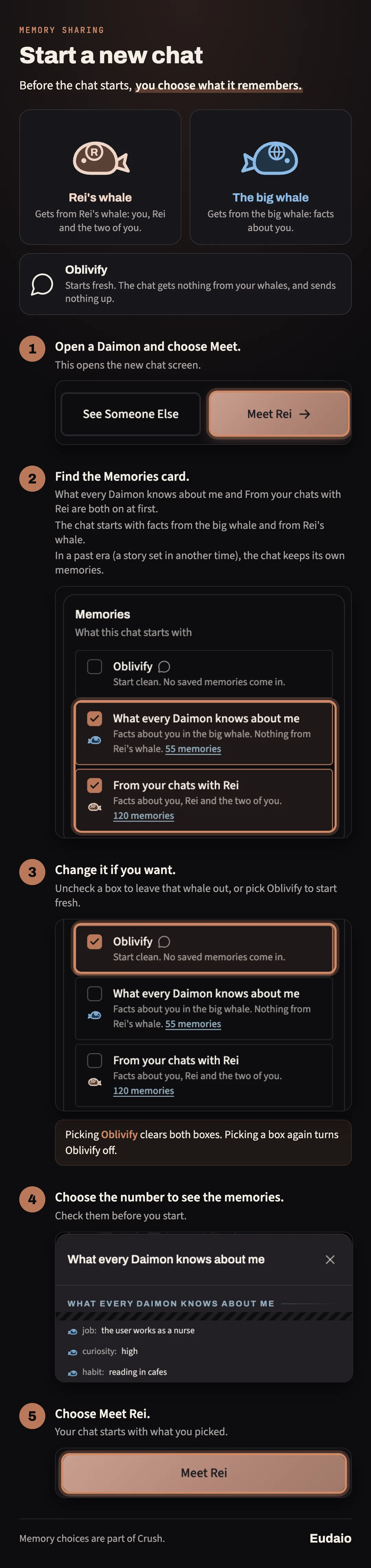
On Crush, you choose this before a new chat starts. Under Memories, you see three choices:
- Oblivify starts fresh. No saved memories come in.
- What every Daimon knows about me gets facts about you from the big whale.
- From your chats with Rei adds Rei's whale: facts about you, about Rei, and about the two of you.
Both of the last two are picked unless you change them. When sharing with Rei is off, Oblivify is picked instead, and only both boxes together bring memories. They each show how many memories they bring. Choose the number to see them. In a past era, the chat keeps its own memories, so there is no choice.
An Oblivify chat sends nothing up. What you say there stays in that chat. To bring memories into it later, choose Receive.
How does memory work on Free?
On Free, facts stay in each chat. Your Daimon saves what you tell them as you talk, and those facts stay in that chat.
If you tell them something new about the same thing, like a new city, the newer one is what they go by.
You can read every saved memory in the Memory Panel. On Crush, you can also correct or remove memories one by one.
Memory whales and the Memories choice for new chats are part of Crush.
Does my Daimon remember their promises?
Yes, and you can ask for one.
There's nothing to set up. Just say it in chat, like "remind me to buy eggs in the afternoon" or "tell me to brush my teeth at 8:34", and your Daimon will message you when it's due.
Give a loose time like "in the afternoon" and they'll reach out at some point that afternoon. Give an exact time and they'll message you right then. With notifications on, the reminder reaches you even when the app is closed.
Heads up:Reminders can't replace your real calendar or alarm yet. If something is important, don't count on your Daimon for it just yet. We're still improving this.
The same goes for promises your Daimon makes on their own. Each one is listed in the Memory Panel with when it's due, and if the two of you change the plan, the promise changes with it.
Promises are part of how the relationship develops.
Why does my Daimon have a diary?
Memory records what happened.
A diary is what your Daimon made of it.
After meaningful moments, they can write diary entries about the two of you. You're reading their perspective on what happened, not a transcript or a summary of what you said.
As the relationship grows, those entries become another record of how it looked from their side.
On Crush, the diary also shows entries from your chats with the same Daimon, each marked (from another chat) with a link to it. Entries from archived chats stay hidden.
In an Oblivify chat, the diary shows only that chat's entries. It is the same when Our Relationship is set to Only this chat on the Send page. Entries from an Oblivify chat, or written while sharing with that Daimon is off, stay in their own chat.
What are milestones?
Some moments matter more than others.
Milestones record significant points in your relationship and place them in a timeline, and they are part of how a relationship grows.
They aren't erased because you had a bad conversation afterward. If something happened between you, it remains part of your shared history.
Over time, that turns a long chat into something closer to a story you can actually look back through.
Does memory work in my language?
The conversation itself isn't limited to English.
Memory headings, categories, and other labels can also be presented in your selected language, and memories can be translated when needed.
So you can read what your Daimon remembers about you in the language you actually speak.
Where are my conversations kept?
Your Daimon's replies are produced by our own self-hosted models.
Our Privacy Policy explains what we store and how long we keep it.
Does memory follow me to another device?
Yes.
The relationship belongs to your account, not the browser you happened to use that day.
Sign in somewhere else and your memories are still there.
Some interface preferences, such as your font or theme, can remain specific to the device. The things your Daimon knows about you don't.
Why memory matters
Memory isn't useful because an AI can recite facts about you.
It's useful because you can stop managing the conversation.
You don't need to think, "Did I already explain this?"
You don't need to introduce the same people again.
You don't need to recap the last three months before talking about what happened today.
And a conversation you invested time in doesn't have to become worse simply because it became long.
Your Daimon remembers because a relationship without a past eventually starts feeling like the same first conversation over and over again.